Skip to content
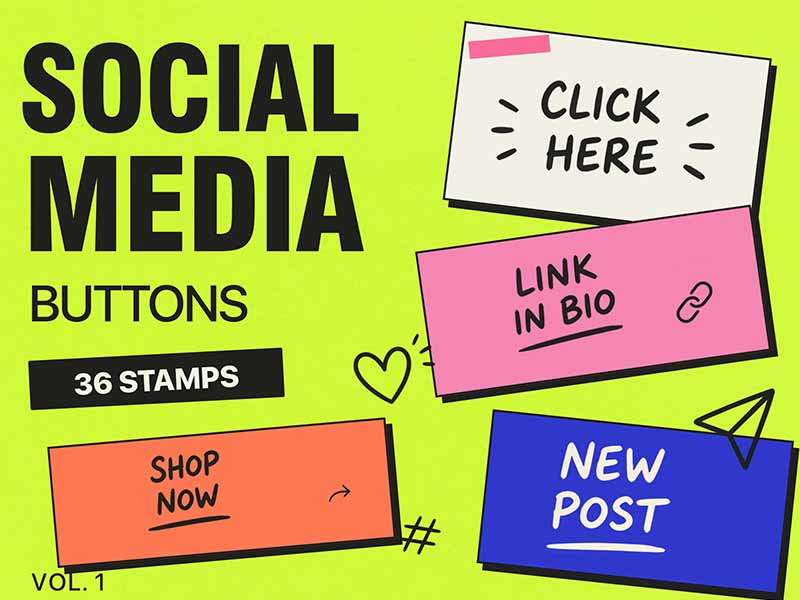
Social Media Buttons Vol.1 artwork and Procreate brush previews
Artist Brushes for Procreate

Social Media Buttons Vol.1Brush pack for Procreate

36 brushes in this pack

Download in the app

Opens the App Store · iPad & iPhone
Some content requires in-app purchases.

Meet your next set of tools

About Social Media Buttons Vol.1

Social Media Buttons Vol. 1 includes 36 high-quality stamps featuring stylish social media buttons, labels, icons, and call-to-action elements like Shop Now, Stay Tuned, New Post, hashtags, links, and more. Instantly enhance your stories, posts, planners, and digital designs with eye-catching social media graphics that save time and make your content stand out. Perfect for content creators, designers, and anyone looking to add a professional social media touch to their artwork.


Every brush, a new possibility.

36 brushes · Full pack preview
Add brush stroke preview from Social Media Buttons Vol.1 for Procreate
Add
Check It Out brush stroke preview from Social Media Buttons Vol.1 for Procreate
Check It Out
Click Here brush stroke preview from Social Media Buttons Vol.1 for Procreate
Click Here
Comment brush stroke preview from Social Media Buttons Vol.1 for Procreate
Comment
DM Me brush stroke preview from Social Media Buttons Vol.1 for Procreate
DM Me
Don't Miss brush stroke preview from Social Media Buttons Vol.1 for Procreate
Don't Miss
Follow brush stroke preview from Social Media Buttons Vol.1 for Procreate
Follow
Forward brush stroke preview from Social Media Buttons Vol.1 for Procreate
Forward
Hashtag brush stroke preview from Social Media Buttons Vol.1 for Procreate
Hashtag
Join Now brush stroke preview from Social Media Buttons Vol.1 for Procreate
Join Now
Learn More brush stroke preview from Social Media Buttons Vol.1 for Procreate
Learn More
Like brush stroke preview from Social Media Buttons Vol.1 for Procreate
Like
Link In Bio brush stroke preview from Social Media Buttons Vol.1 for Procreate
Link In Bio
Link brush stroke preview from Social Media Buttons Vol.1 for Procreate
Link
Mention brush stroke preview from Social Media Buttons Vol.1 for Procreate
Mention
New Post brush stroke preview from Social Media Buttons Vol.1 for Procreate
New Post
Poll Time brush stroke preview from Social Media Buttons Vol.1 for Procreate
Poll Time
Read More brush stroke preview from Social Media Buttons Vol.1 for Procreate
Read More
Reply brush stroke preview from Social Media Buttons Vol.1 for Procreate
Reply
Save brush stroke preview from Social Media Buttons Vol.1 for Procreate
Save
See More brush stroke preview from Social Media Buttons Vol.1 for Procreate
See More
Share brush stroke preview from Social Media Buttons Vol.1 for Procreate
Share
Shop Now brush stroke preview from Social Media Buttons Vol.1 for Procreate
Shop Now
Stay Tuned brush stroke preview from Social Media Buttons Vol.1 for Procreate
Stay Tuned
Subscribe brush stroke preview from Social Media Buttons Vol.1 for Procreate
Subscribe
Support Me brush stroke preview from Social Media Buttons Vol.1 for Procreate
Support Me
Swipe Down brush stroke preview from Social Media Buttons Vol.1 for Procreate
Swipe Down
Swipe Left brush stroke preview from Social Media Buttons Vol.1 for Procreate
Swipe Left
Swipe Right brush stroke preview from Social Media Buttons Vol.1 for Procreate
Swipe Right
Swipe Up brush stroke preview from Social Media Buttons Vol.1 for Procreate
Swipe Up
Tap Here brush stroke preview from Social Media Buttons Vol.1 for Procreate
Tap Here
Thank You brush stroke preview from Social Media Buttons Vol.1 for Procreate
Thank You
Trn On Notifications brush stroke preview from Social Media Buttons Vol.1 for Procreate
Trn On Notifications
Vote Now brush stroke preview from Social Media Buttons Vol.1 for Procreate
Vote Now
Watch Now brush stroke preview from Social Media Buttons Vol.1 for Procreate
Watch Now
Your Turn brush stroke preview from Social Media Buttons Vol.1 for Procreate
Your Turn
From inspiration to your canvas

How to get Social Media Buttons Vol.1

Use Artist Brushes to bring your next set of tools into Procreate.

  1. 01

    Get Artist Brushes

    Download Artist Brushes for Procreate from the App Store on your iPad or iPhone.

  2. 02

    Find your pack

    Look for “Social Media Buttons Vol.1” in the app and open the pack. Some content requires in-app purchases.

  3. 03

    Import and start drawing

    Use the app’s download and export options to open the brushes in Procreate on iPad or Procreate Pocket on iPhone. Procreate is required and sold separately.

Make it part of your toolkit.

Find Social Media Buttons Vol.1 in Artist Brushes for Procreate.

Download on the App Store
Keep exploring

More brushes you might love